

Property maintenance in supported living is rarely just a repair ticket. A single change can create a chain of operational tasks: a room status needs updating, an inspection may be required, cleaning might need scheduling, repairs need assigning, and managers need to know when the room is ready for a new placement.
That is why automations have now come to the Flocare property maintenance module. The aim is simple: help teams create repeatable workflows so important property actions are triggered at the right time, with less manual chasing.
Why property maintenance needs workflow thinking
Supported living providers often manage accommodation alongside support. That means property work affects more than buildings. It affects safety, occupancy, staff workload, placement readiness and the experience of the person being supported.
Without clear workflows, property teams can end up relying on emails, spreadsheets, messages and memory. A room move might be recorded in one place, a maintenance issue in another, and the readiness status somewhere else. That fragmentation makes it harder for managers to know what is happening.
Automation helps by turning known triggers into consistent actions.
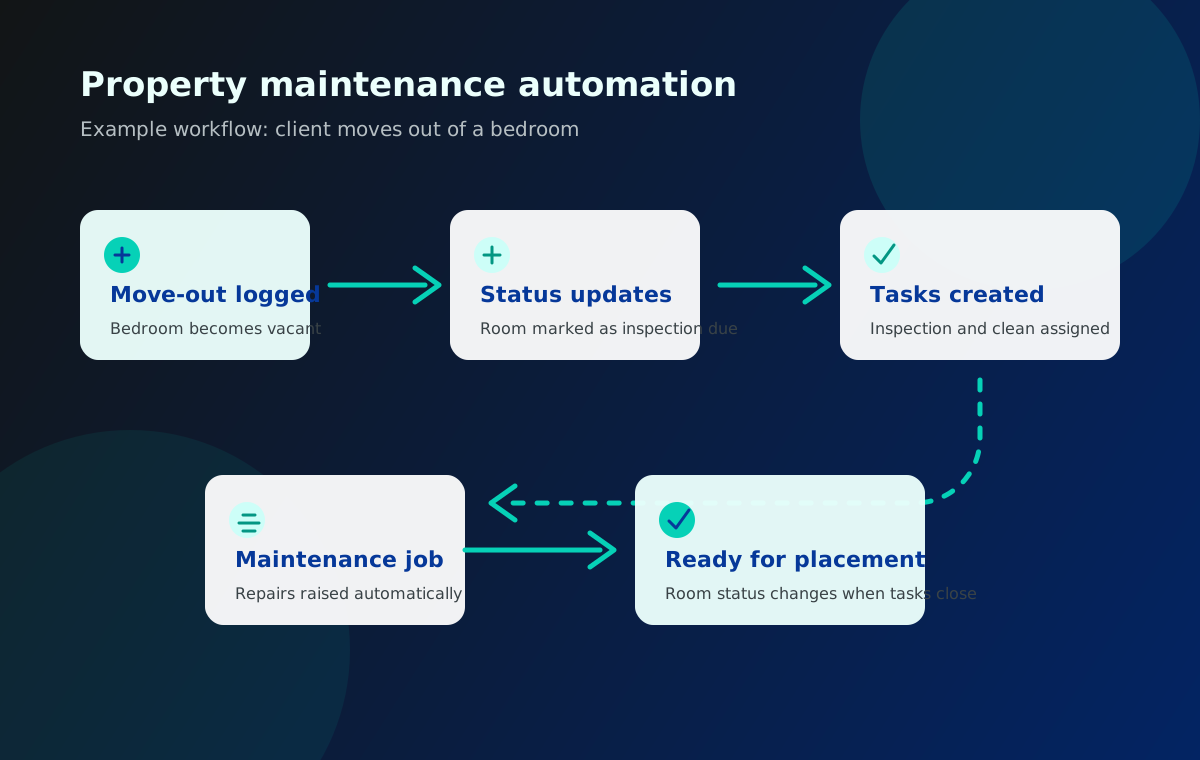
Example workflow: client moves out of a bedroom
A common example is a client moving out of a bedroom. That event may trigger several steps:
- The bedroom status changes from occupied to vacant.
- An inspection task is created.
- A cleaning task is assigned.
- Any required repair job is raised.
- The room is marked as not ready until checks are complete.
- Managers can see progress without asking for manual updates.
- Once tasks are completed, the room can move to ready for placement.
This type of workflow is easy to describe, but in a busy service it is also easy for one step to be missed. Automations reduce that risk by making the next step part of the process.
What can automation support?
The first use cases focus on property and maintenance workflows where the next action is predictable. Examples include:
- A room status change creating inspection tasks.
- A move-out triggering cleaning and maintenance checks.
- A maintenance issue creating assigned follow-up work.
- A high-priority repair alerting the right manager.
- A completed job prompting a review or sign-off task.
- A property check identifying an action that needs ownership.
The goal is not to automate judgement. The goal is to automate the repeatable admin around judgement so teams can focus on the work that needs human attention.
Why this matters for supported living providers
Property work can become a hidden operational pressure. If a repair is delayed, it may affect someone’s safety or comfort. If room readiness is unclear, placements can be delayed. If managers cannot see outstanding work, small issues can become larger problems.
Automation helps providers improve:
- Visibility of outstanding maintenance work.
- Consistency in move-in and move-out processes.
- Accountability for inspections, cleaning and repairs.
- Evidence that checks and actions were completed.
- Communication between support, housing and maintenance teams.
For organisations managing multiple properties, these benefits become more important. Manual coordination may work for a small number of rooms, but it becomes harder to sustain as services grow.
Reducing manual chasing
A lot of operational time is spent asking questions such as:
- Has the room been inspected?
- Has cleaning been arranged?
- Who owns the repair?
- Is the bedroom ready yet?
- Has the issue been signed off?
- Did anyone update the status?
Automations help reduce that chasing by creating tasks and status changes inside the workflow. Managers can still intervene, but they are not starting from a blank page.
Keeping teams aligned
Property work often crosses team boundaries. Support staff may notice an issue. A service manager may need visibility. A maintenance worker may need a clear job. Housing or operations teams may need to understand readiness and occupancy.
When each team uses a different tracker, the risk of confusion increases. Flocare automations help keep the workflow connected to the property record, the room, the task and the status of the work.
That makes it easier to answer operational questions quickly.
Automation should still be controlled
Automations are useful, but they should be intentional. A workflow should be clear enough that staff understand what will happen when a trigger is used. Too many automations can create noise. Too few may leave teams still doing repetitive admin manually.
Good automation design asks:
- What event should trigger the workflow?
- What task or status change should happen next?
- Who should own the action?
- When should the task be due?
- What should happen when the task is completed?
- Who needs visibility?
This keeps automation practical rather than overwhelming.
What this means for Flocare users
For Flocare users, property maintenance automations are designed to make the module more proactive. Instead of simply recording issues, teams can create workflows that move work forward.
A move-out can create the right checks. A property issue can create an assigned job. A completed job can trigger sign-off. The record becomes more than a log. It becomes part of how the work is managed.
Key takeaways
Property maintenance in supported living is operationally important. It affects safety, occupancy, readiness and staff workload. Automations help teams standardise predictable workflows, reduce manual chasing and keep maintenance actions visible.
The new Flocare property maintenance automations are designed to support practical workflows such as move-outs, inspections, cleaning, repairs and room readiness. They help teams move from recording property work to actively managing it.